



The last piece in this series covered SnowTrace, Avascan, and SnowScan and when to use each one.
This article focuses on what those tools actually show you. A wallet page is more than a collection of balances and transactions; it’s a record of behavior. Every balance, token, approval, and contract interaction is a clue.
The guiding principle is simple: Always watch for the weird, the unexpected, and the unprecedented.
Address & Balance Overview
At the top of the page you’ll see the wallet address: a long 0x... string that serves as the account’s identifier on Avalanche’s C-Chain.
Sometimes explorers attach labels to known addresses such as exchanges, protocols, routers, or treasury wallets. If no label exists, all you know is that the address has no publicly recognized identity. Many explorers also allow users to create private name tags for addresses they frequently monitor. These labels are personal notes and do not verify the identity or legitimacy of an address.
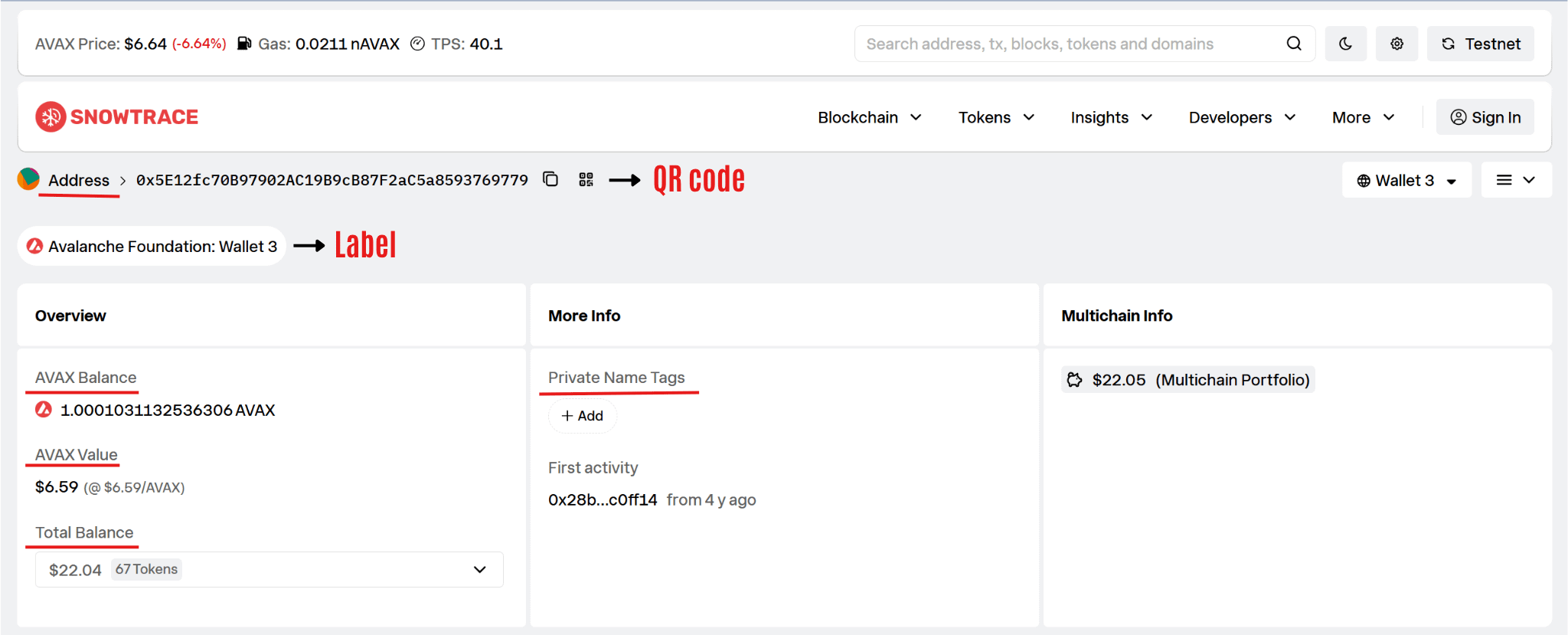
Directly beneath the address, you’ll typically find the wallet’s AVAX balance and estimated USD value. By themselves, these figures reveal very little. A wallet may be active, dormant, newly created, or emptied after an attack. The important part is context.
You’ll also see convenience features such as copy buttons and QR codes. These make addresses easier to share but provide no security information.
Normal: A standard address, with or without a label, and balances that align with the wallet’s expected activity.
Warning: Explorer-generated scam warnings, known malicious addresses, or near-zero AVAX balances paired with large numbers of unfamiliar tokens.
Takeaway: The header provides context, not trust. Labels and balances can be useful clues, but the wallet’s activity is what matters most.
Token Holdings
Below the Total balance, you’ll see the wallet’s total balance and the number of assets it holds. Clicking the dropdown arrow expands the asset breakdown, revealing the tokens, NFTs, LP tokens, and other assets associated with the address.
What you find there falls into two categories: assets you acquired intentionally, and assets you didn’t.
Legitimate holdings are usually assets you intentionally acquired, such as stablecoins, LP tokens, governance tokens, or recognized currencies like USDC and WAVAX.
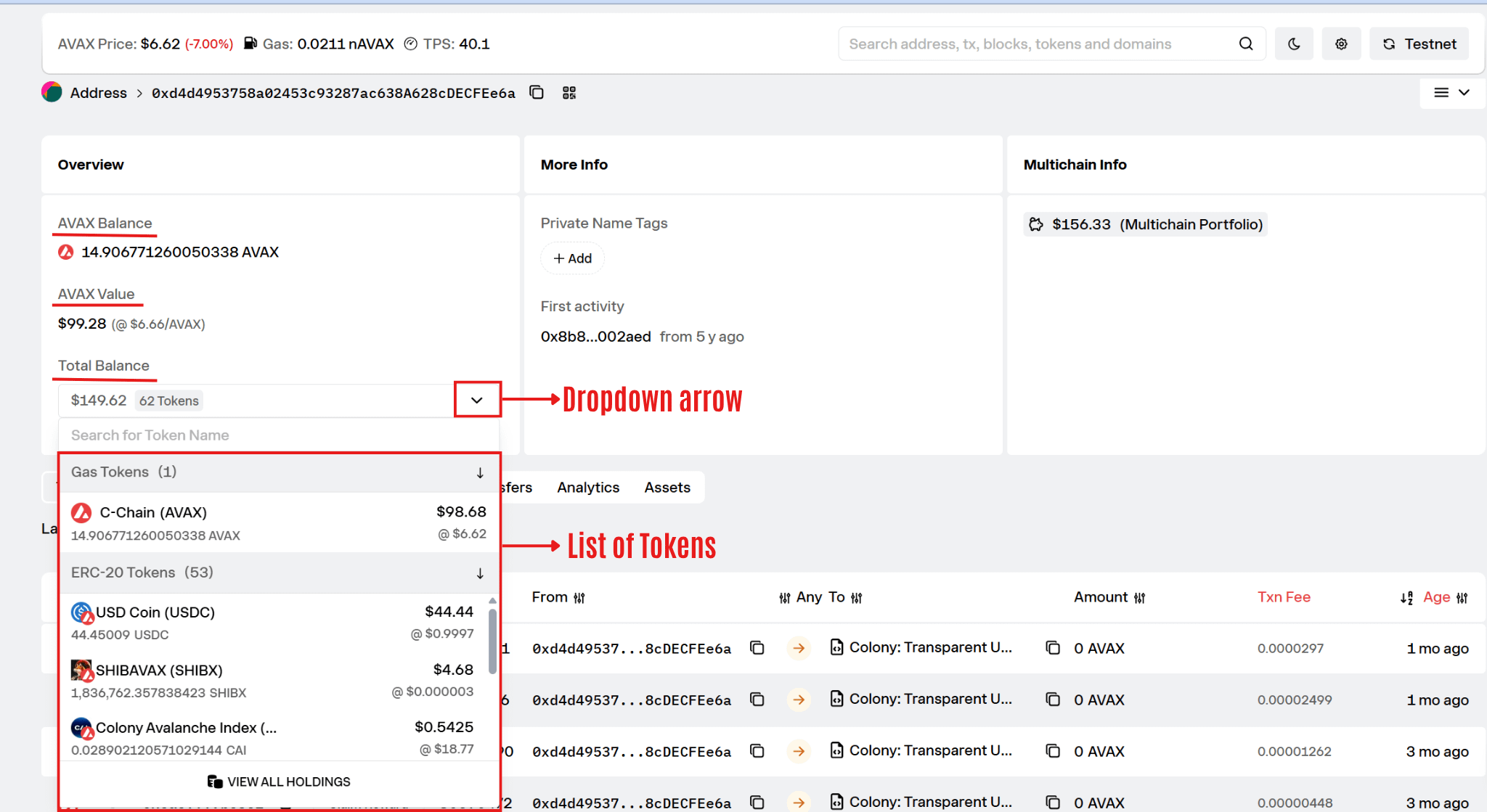
Unfamiliar entries are often spam tokens; worthless assets airdropped to wallets as part of scam campaigns.
The most common red flag here is the presence of unsolicited tokens.
Scammers frequently airdrop worthless tokens to random wallets. The goal is not the token itself but the interaction that follows. Users are encouraged to visit a website, connect a wallet, approve a transaction, or “claim” a reward. Those actions often lead to theft.
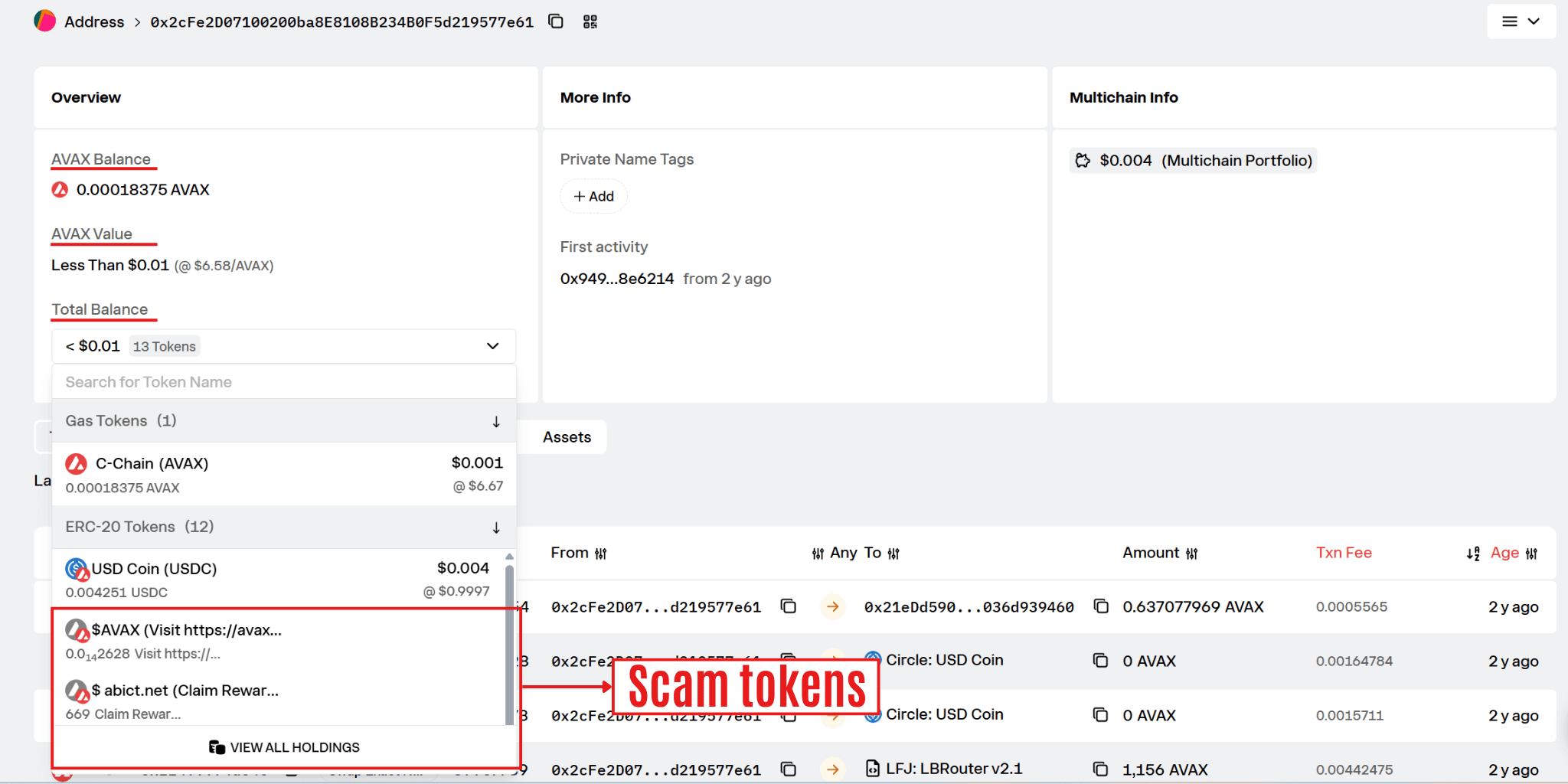
Many scam tokens are unsellable, have malicious contract logic, or direct users toward phishing sites.
If you encounter tokens you never purchased, do not interact with them simply because they appear valuable.
Normal: Recognizable assets acquired through expected activity.
Warning: Large numbers of unfamiliar tokens, especially when they make up most of the wallet’s holdings.
Takeaway: The tokens you don’t recognize often deserve more attention than the ones you do.
Transaction History
The transaction list is the wallet’s activity log. It records what the address has done on-chain.
Key fields include:
Hash: Unique transaction identifier.
Method: The function that was called.
Timestamp: When the transaction occurred.
From/To: The sender and recipient.
Value: Amount of AVAX transferred.
The Method column provides a quick summary of what the transaction did. In this example, we see actions such as Transfer, Approve, Multicall, and Swap Compact. Depending on the explorer and transaction type, some simple transfers may appear as Transfer or may have no decoded method displayed, while DeFi interactions typically show the function or action being executed.
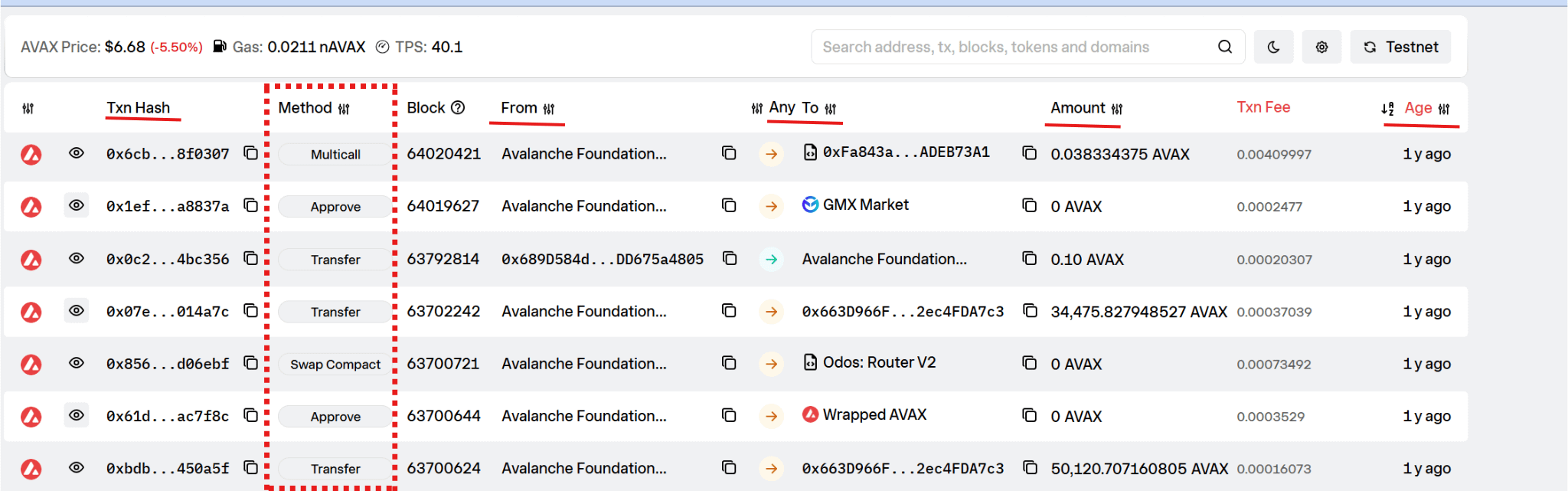
Normal: Activity that matches the wallet’s purpose and history.
Warning: Repeated interactions with unknown contracts, unexpected approvals, or large-value transactions involving unfamiliar assets.
Whenever something seems off, start here. Most wallet investigations begin by identifying the transaction that changed everything.
Takeaway: The Method field often reveals the transaction’s purpose at a glance, while the From/To fields help identify unexpected recipients or unusual contract interactions.
Approval Transactions
One method worth paying special attention to is Approve. When you approve a token, you give another contract permission to spend that asset on your behalf. Approvals are required for many DeFi activities, including swaps, liquidity provision, and lending, and typically appear in the transaction history as an Approve call directed at a protocol or smart contract.
The problem is that these permissions often remain active long after you stop using an application. Some approvals are effectively unlimited, granting permission to spend the maximum possible amount. On explorers, these may appear as extremely large values representing the maximum uint256 amount.
That becomes dangerous when:
The approved contract is malicious.
The protocol is compromised.
You were tricked into signing an approval through a phishing site.
Many wallet-draining attacks begin with an approval rather than a direct theft. The attacker doesn’t need your tokens immediately; they only need permission to access them later.
Normal: Approval transactions involving reputable protocols you actively use, often for specific amounts or recent activities.
Warning: Approval transactions you don’t remember making, unfamiliar spender contracts, or old unlimited approvals that are no longer needed.
If you discover questionable approvals, revoke them immediately using a trusted revocation tool.
Takeaway: An approval does not move funds immediately, but it grants permission for future transfers. Treat approval transactions with the same caution you would treat access keys to your assets.
Internal Transactions
Internal transactions are the contract-to-contract calls that occur during the execution of a transaction. They do not have their own transaction hashes because they happen inside a larger transaction initiated by the user.
This matters because the main transaction page often shows only the starting point. In our example, the wallet interacts with LFJ: Router V1, but the Internal Txns tab reveals seven additional contract calls involving LFJ: Joe Pair, Wrapped AVAX, and Orange: JUICE. These behind-the-scenes interactions are what allow the swap to execute successfully.
Without checking the Internal Txns tab, you may miss how assets actually moved through the protocol.
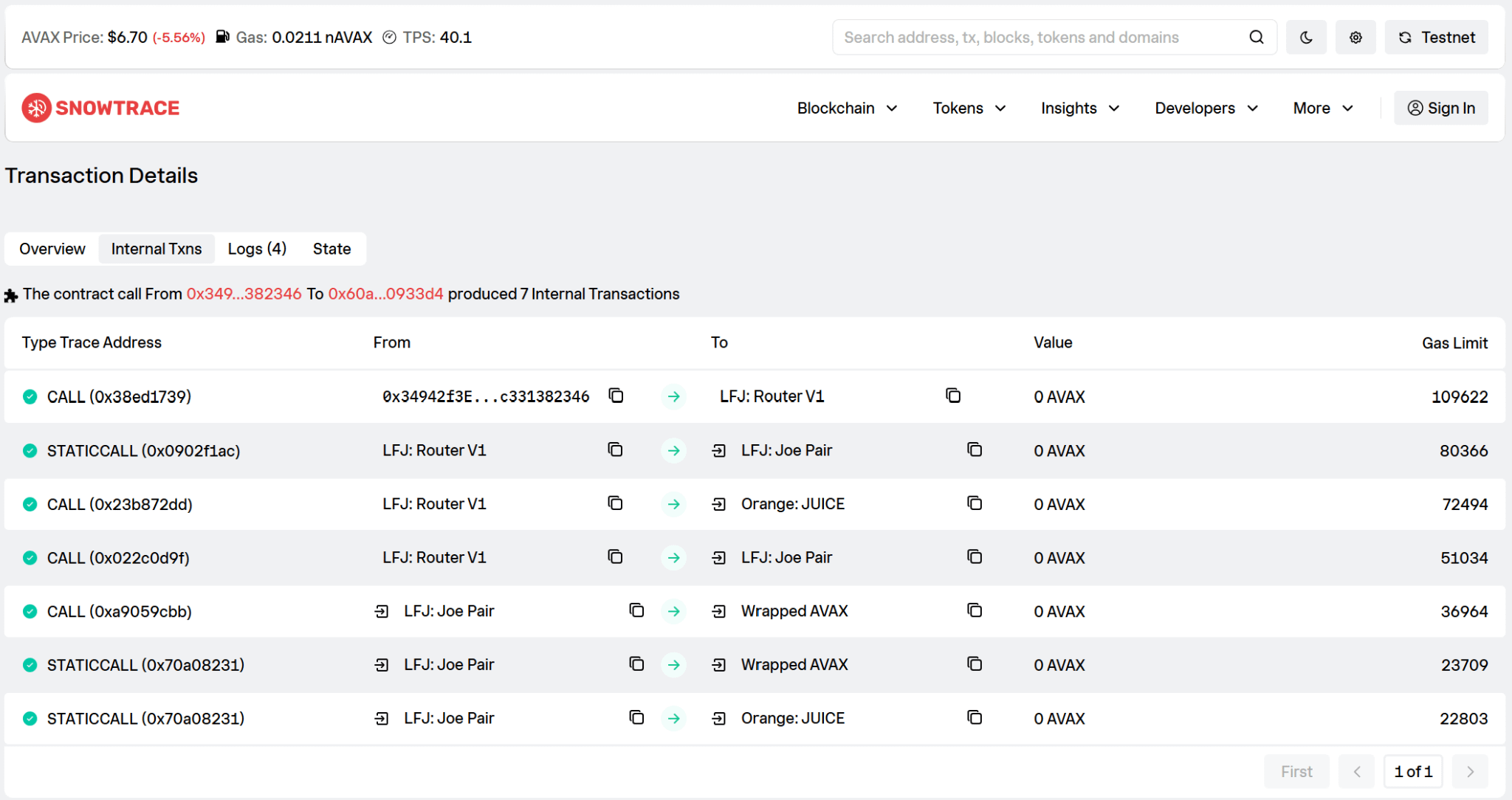
Normal: Multiple internal transactions generated by swaps, liquidity operations, lending protocols, and other DeFi activities.
Warning: Unexpected contract interactions or internal transfers that help explain missing funds or unexplained balance changes.
Takeaway: Internal transactions reveal what happened behind the scenes. When investigating a transaction, don’t stop at the overview page; follow the internal calls to see the full flow of assets.
Liquidity Positions
Liquidity providers receive LP tokens that represent their share of a pool.
These tokens act as receipts. When liquidity is added, LP tokens are minted. When liquidity is removed, LP tokens are burned.
If you actively provide liquidity, seeing LP tokens is expected.
The important question is whether you recognize the underlying pool.
An LP position tied to a legitimate trading pair is usually unremarkable. An LP position connected to an unfamiliar or suspicious token deserves investigation.
Normal: LP tokens from pools you knowingly joined.
Warning: Liquidity positions you don’t recognize or pools built around questionable assets.
Takeaway: LP tokens represent ownership in a pool. If you don’t remember joining that pool, find out why the position exists.
Contract Interactions: Verified vs. Unverified
Whenever a wallet interacts with a smart contract, the explorer allows you to inspect that contract. The first thing to check is its verification status.
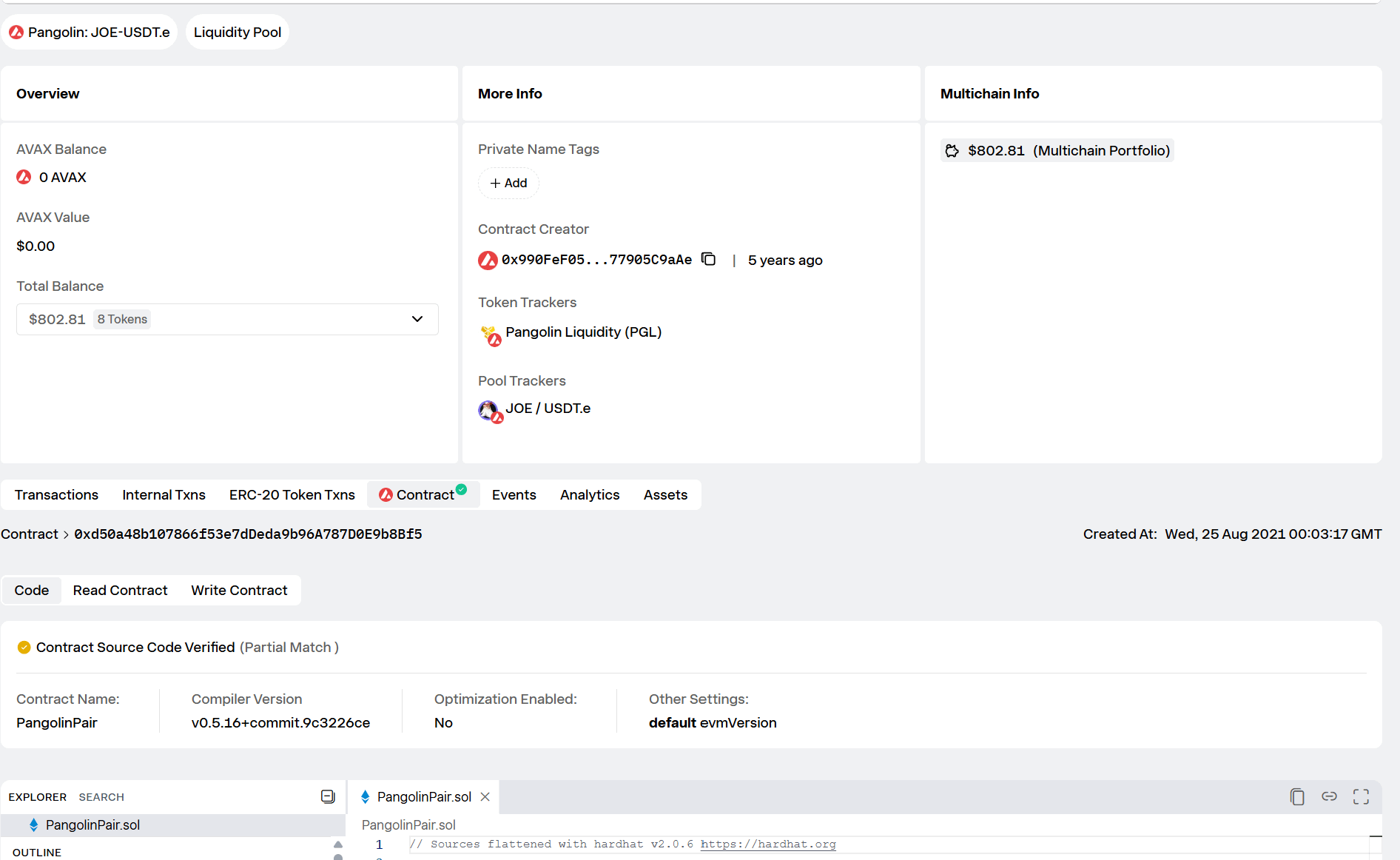
A verified contract has publicly available source code that matches the deployed bytecode. In the example below, the Pangolin JOE-USDT.e Liquidity Pool displays a verification badge and a “Contract Source Code Verified” notice. SnowTrace also shows the contract name, compiler information, and the contract’s source code, allowing anyone to inspect how it works.
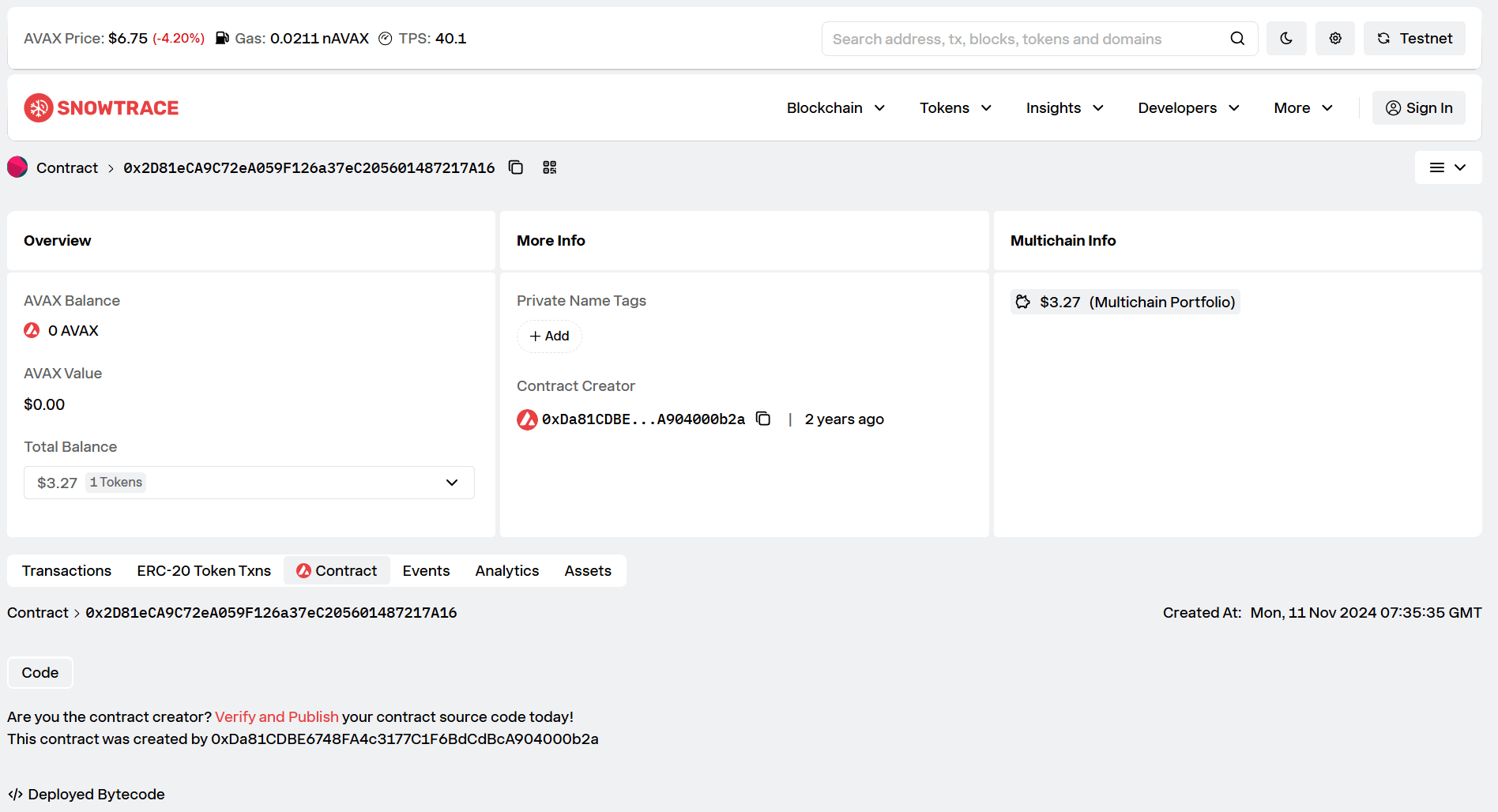
An unverified contract provides much less transparency.
In the example below, the DeltaPrime attack contract 0x2D81eCA9C72eA059F126a37eC205601487217A16 shows only basic contract information and deployed bytecode. The source code is unavailable, making it impossible to inspect the contract’s logic through the explorer.
Verification improves transparency, but it does not guarantee safety. A verified contract can still contain bugs, risky permissions, or intentionally harmful functionality. Likewise, some legitimate projects may temporarily remain unverified.
Normal: Interactions with established, verified contracts whose code and behavior can be independently reviewed.
Warning: Unexpected transfers, approvals, or interactions involving unverified contracts deserve extra scrutiny. If you cannot inspect the code, you are relying entirely on trust.
Takeaway: Verification provides transparency, not trustworthiness. A green checkmark lets you inspect a contract’s code; it does not guarantee that the contract is safe.
Reading the Full Story
Throughout this guide, we’ve examined different wallet addresses, transactions, and contracts to highlight specific security concepts.
In practice, no single data point proves that something is safe or malicious. Instead, patterns emerge when you combine information from balances, token holdings, transaction history, internal transactions, approvals, and contract interactions.
The goal is not to memorize every field on a wallet page. It’s to understand what each section tells you and when something looks out of place. A strange token, an unexpected approval, an unusual transaction, or an interaction with an unverified contract may be harmless on its own. Together, however, these clues can point to a larger issue.
Takeaway: A wallet page is one of the most powerful security tools available to any on-chain user. Most scams leave traces long before users realize something is wrong. The users who learn to spot those traces early are usually the ones who keep their funds.

Looking to join the global community live? Registration is now open for Avalanche Summit NYC. Secure your pass today for 2 days of exclusive keynotes and networking.